Case study · SaaS · Productivity / Workforce analytics
Timegram: Building a Time-Tracking SaaS from UI to Team Lead
2.5 years building Timegram, a privacy-first time-tracking SaaS: from the React UI to leading development across Firebase, Paddle billing and reporting.
- Client
- Timegram
- My role
- Frontend Developer → Full-Stack Developer → Development Lead
- Timeline
- 2.5 years
- Year
- 2023
- React
- Firebase Auth
- Firebase Database
- Cloud Functions
- Scheduled Jobs (Cron)
- Paddle
Overview
Timegram is an automatic time-tracking and productivity platform for remote and hybrid teams. It gives managers accurate data on time, projects and team capacity, without invasive monitoring such as screenshots or keystroke logging.
I worked on Timegram for 2.5 years. It started as a client project during my time at Atompoint, and the founder then hired me directly to keep building it. I joined to build the React user interface, took on more and more of the backend (authentication, database, serverless functions, scheduled reporting and payments), and by the end I was leading development of the product.
The challenge
Teams that track time usually face a choice: track everything and make employees feel watched, or track nothing and lose visibility into projects, billing and capacity.
Timegram's goal was a product that sits between the two. That meant the app had to:
- Show managers clear, real-time data on team time, capacity and project progress
- Let team members review and decide what tracked activity to log
- Support companies of different sizes with different roles and permissions
- Handle subscriptions and plan limits automatically
- Send regular reports without anyone running them manually
My role
- Frontend (React): built the main web app: dashboard, time tracker, projects, team, clients, invoices and insights screens
- Backend (Firebase): authentication, database structure and security rules
- Serverless logic: Cloud Functions for server-side work such as calculations, triggers and integrations
- Scheduled reporting: cron-based scheduled functions that generate and send reports automatically
- Payments: integrated Paddle for subscriptions, plan levels and billing events
- Access control: user roles and permissions (owner, admin, user) across teams and projects
- Leadership: grew from the UI developer into the person leading development, responsible for technical decisions, priorities and code quality
The approach
A dashboard managers can read in seconds
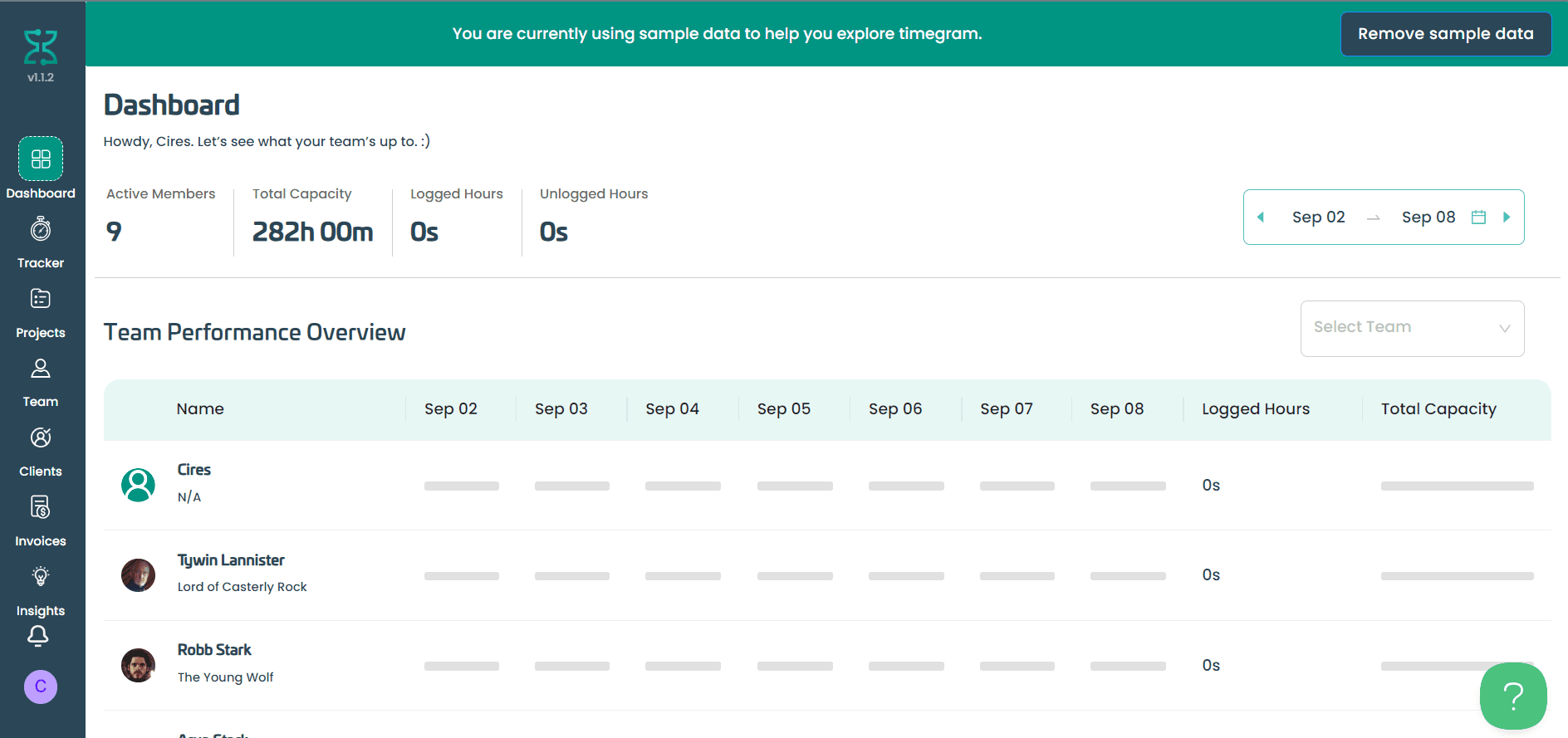
The dashboard (shown at the top of this page) gives the numbers that matter at a glance: active members, total capacity, logged hours and unlogged hours for a chosen week. Below that, the team performance overview breaks each person's logged time down by day against their capacity, filterable by team.
Tracking that respects privacy
Instead of screenshots, the tracker groups activity by app and website, and the team member chooses which activities to log to which task. This "employee-controlled" model was central to the product, and the UI had to make reviewing and logging time fast.
Projects and tasks in one view
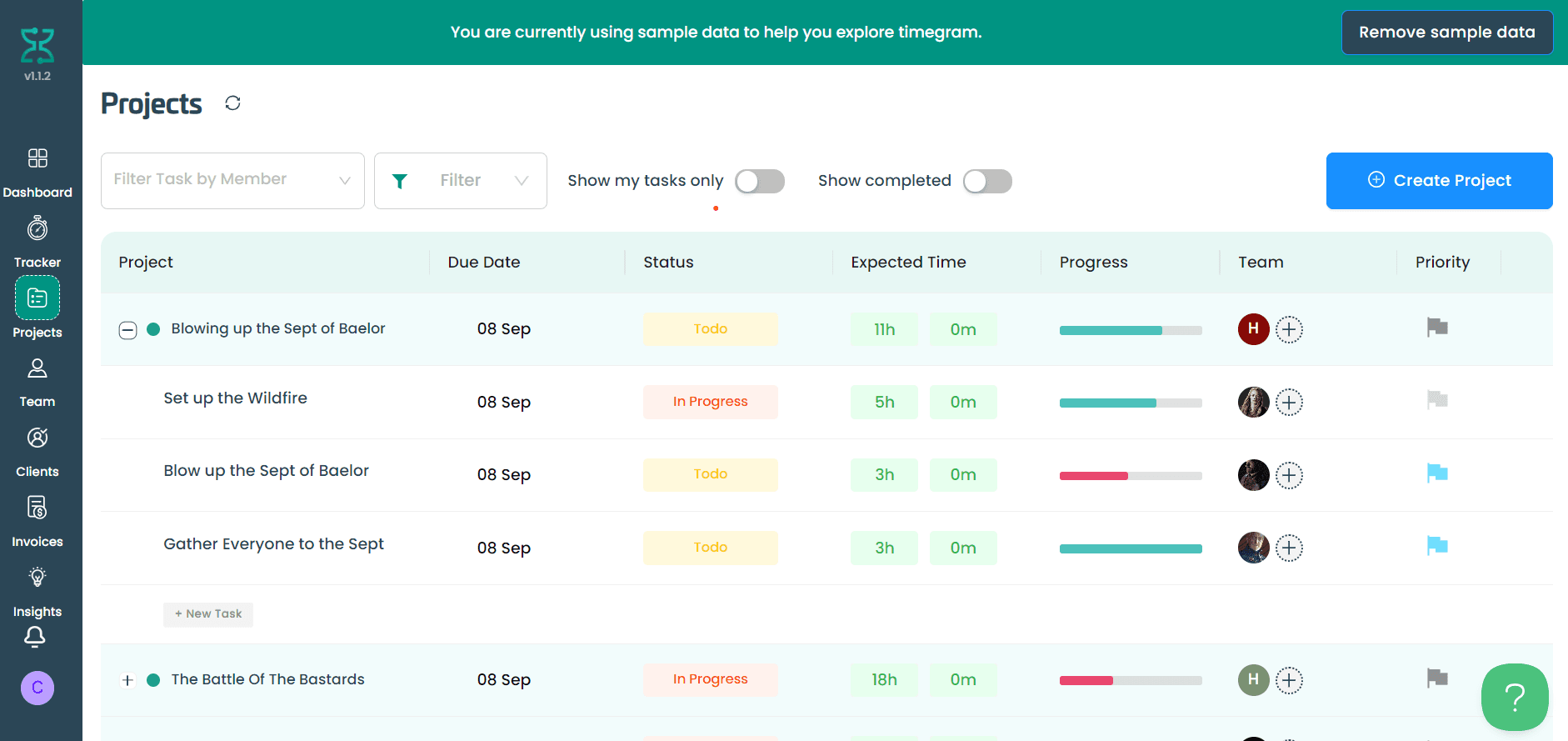
Projects expand into their tasks, each with due date, status, expected time, progress, assigned team members and priority. Filters let managers view tasks by member, show only their own tasks, or include completed work.
Teams, roles and permissions
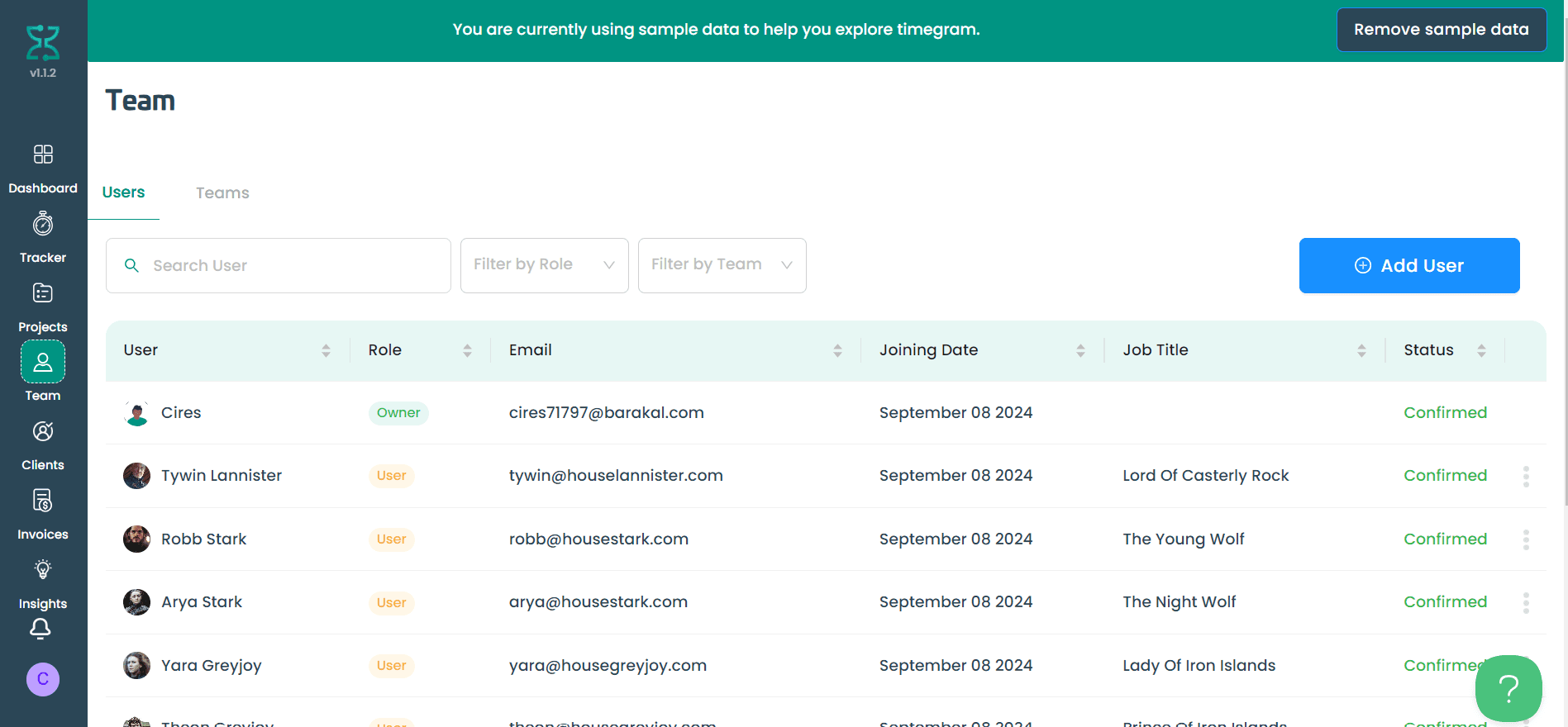
The team area manages users and teams, with search and filters by role and team. Roles decide what each person can see and do across the product, which I enforced both in the UI and in the backend rules, so permissions can't be bypassed from the browser.
Subscriptions with Paddle
I integrated Paddle to handle plans, trials and recurring billing. Paddle's webhook events are processed in Cloud Functions to keep each company's plan and limits up to date in the database, so access changes automatically when someone upgrades, downgrades or cancels.
Automated reporting
Scheduled Cloud Functions (cron jobs) gather time data and generate reports on a regular schedule, so managers receive their reports without anyone running them by hand.
Onboarding with sample data
New accounts can explore Timegram with realistic sample data, then remove it with one click. This helps new teams understand the product before inviting their colleagues.
Architecture
- Web app → Firebase Auth: Auth
- Web app → Firebase Database: Read / write · secured by rules
- Web app → Paddle: Checkout
- Paddle → Cloud Functions: Webhooks
- Cloud Functions → Firebase Database
- Scheduled functions → Firebase Database
- Scheduled functions → Email / notifications: Reports
Technical highlights
- Role-based access in two places: permissions checked in the UI for a clean experience, and enforced in database rules and Cloud Functions for real security
- Billing state from webhooks: the database is the single source of truth for each company's plan, updated by Paddle events rather than by the browser
- Serverless and scheduled work: no servers to maintain; heavy and repeating work runs in Cloud Functions and scheduled jobs
- From UI to ownership: over 2.5 years I moved from building screens to owning the full product architecture and leading development
Results
- From the first screen to leading development
- 2.5 years
- Plans, trials and role-based access billed through Paddle
- Automated